Retail AI Vision Systems are quickly becoming one of the most practical technologies for modern stores that want better visibility, faster operations, and smarter decision-making. Instead of relying only on manual checks, staff reports, or delayed point-of-sale data, retailers can now use AI-powered cameras, computer vision, edge devices, and analytics platforms to understand what is happening inside the store in real time.
- What Are Retail AI Vision Systems?
- Why Retail AI Vision Systems Matter Now
- Key Benefits of Retail AI Vision Systems Integration
- Common Use Cases for Retail AI Vision Systems
- How Retail AI Vision Systems Work
- Implementation Strategy for Retail AI Vision Systems
- Privacy, Ethics, and Compliance Considerations
- Challenges of Retail AI Vision Systems Integration
- Real-World Scenario: How a Store Might Use Retail AI Vision Systems
- Best Practices for Successful Integration
- Future of Retail AI Vision Systems
- FAQs About Retail AI Vision Systems
- Conclusion
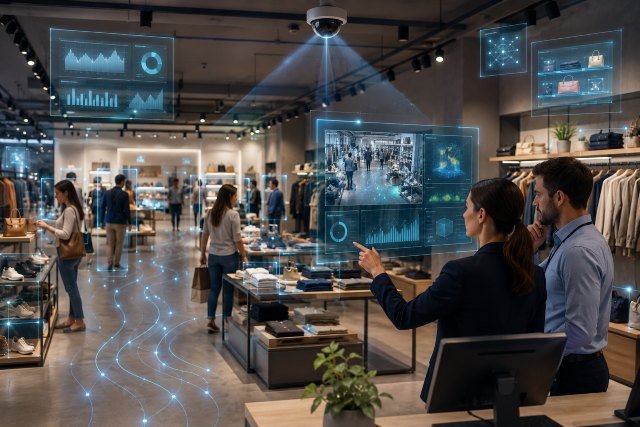
At a basic level, retail AI vision systems use cameras and machine learning models to interpret visual information. They can detect empty shelves, identify product placement issues, monitor checkout queues, support loss prevention, study customer flow, and help teams respond before a small problem becomes a costly one.
This matters because physical retail is under pressure from multiple sides. Stores need to reduce shrink, improve labor productivity, maintain product availability, and create smoother customer experiences. Industry coverage has also highlighted how theft, safety concerns, and locked-up merchandise can affect both operations and shopper satisfaction.
When integrated correctly, Retail AI Vision Systems do not simply “watch” the store. They become part of a connected retail intelligence layer that supports inventory, security, merchandising, workforce planning, and customer experience.
What Are Retail AI Vision Systems?
Retail AI Vision Systems are technology solutions that use cameras, sensors, artificial intelligence, and computer vision software to analyze visual data from retail environments. These systems can recognize objects, track movement patterns, detect anomalies, count inventory, and send alerts to store teams or business systems.
A traditional security camera records what happened. A retail AI vision platform helps interpret what is happening and what action may be needed next.
For example, a normal camera might show that a shelf is empty. A vision system can detect the out-of-stock condition, identify the shelf location, send a restocking alert, and connect that signal to inventory or workforce management software.
This is why retailers are adopting computer vision for inventory management, real-time store monitoring, automated checkout support, and loss prevention. Market research summaries also point to growing use of computer vision in retail for inventory, product placement, customer behavior analysis, and checkout convenience.
Why Retail AI Vision Systems Matter Now
Retail stores generate a huge amount of visual information every day. Customers enter, browse, pick up products, abandon items, wait in lines, and move through different store zones. Staff members restock shelves, handle returns, clean aisles, and manage checkout areas.
For years, much of this activity was invisible unless a manager personally observed it or reviewed camera footage later. That created delays.
Retail AI Vision Systems help turn in-store activity into useful operational signals. These signals can show which shelves need attention, where traffic is building, which displays attract engagement, and where suspicious activity may require a closer look.
This shift is especially important because retailers are trying to balance security with customer experience. Heavy-handed approaches, such as locking up more products, may reduce theft in some cases but can frustrate shoppers and reduce convenience. Technology-driven monitoring can give retailers another option: respond more precisely instead of making the entire shopping experience feel restricted.
Key Benefits of Retail AI Vision Systems Integration
Better Inventory Accuracy
Inventory accuracy is one of the biggest advantages of Retail AI Vision Systems. Manual shelf checks take time, and POS data only confirms what has already been sold. It does not always show whether an item is misplaced, hidden behind another product, or missing from the shelf while still showing as “available” in the system.
AI vision can help detect empty shelves, low-stock conditions, incorrect product placement, and planogram gaps. When connected with inventory management software, these alerts can help staff restock faster and reduce lost sales.
IBM notes that AI inventory management can support real-time visibility, anomaly detection, automated replenishment, demand forecasting, and warehouse operations. These capabilities become more powerful when visual shelf data is added to the broader inventory picture.
Stronger Loss Prevention
Retail loss prevention has moved beyond basic surveillance. AI vision systems can detect unusual movement patterns, repeated shelf-clearing behavior, suspicious exits, or checkout anomalies.
This does not mean every customer should be treated as suspicious. The goal is smarter risk detection, not over-policing. A good system should support staff awareness while still respecting privacy, fairness, and customer dignity.
Retail crime remains a major concern for many stores, and the National Retail Federation’s 2025 report focuses on retailers’ experiences with theft, violence, and safety challenges. AI vision can support loss prevention teams by helping them respond faster and review incidents more efficiently.
Faster Shelf Replenishment
Empty shelves hurt sales and weaken customer trust. If shoppers repeatedly fail to find what they need, they may switch stores or move online.
Retail AI Vision Systems can monitor shelves throughout the day and notify staff when stock levels fall below a set threshold. In grocery, convenience, pharmacy, fashion, and electronics retail, this can help reduce missed sales and improve product availability.
A practical example comes from Starbucks, which announced in 2025 that it was rolling out AI-driven inventory counting across more than 11,000 company-owned stores in North America. The system used AI and visual scanning to help count inventory more frequently and improve product availability.
Improved Customer Experience
Retail AI vision is not only about security or stock control. It can also improve the shopping experience.
For example, cameras can detect long checkout lines, crowded aisles, blocked walkways, or high-traffic zones. Store teams can then open another register, adjust staffing, move promotional displays, or improve store layout.
When used responsibly, this helps customers spend less time waiting and more time shopping. It can also help retailers design stores based on real behavior rather than assumptions.
Better Store Layout and Merchandising
Retailers spend significant money on displays, endcaps, signage, and product placement. But many teams still rely on sales data alone to judge performance.
Retail AI Vision Systems can add behavioral context. They can show whether shoppers stop near a display, how long they engage, which areas they ignore, and whether traffic flows naturally through the store.
This helps merchandising teams test layouts, compare display performance, and make changes based on observed shopper behavior.
More Efficient Labor Planning
Staffing is one of the most sensitive parts of retail operations. Too few workers create long lines and poor service. Too many workers increase costs.
AI vision can help identify busy periods, repeated bottlenecks, and operational pressure points. Over time, this data can support better workforce scheduling.
For example, if the system shows that fitting rooms are busiest between 5 p.m. and 7 p.m. on Fridays, managers can assign staff more intelligently. If checkout queues build at predictable times, labor planning can be adjusted before service quality drops.
Common Use Cases for Retail AI Vision Systems
Shelf Monitoring and Out-of-Stock Detection
Shelf monitoring is one of the most direct use cases. Cameras scan shelves and use computer vision models to detect whether products are missing, misplaced, or incorrectly arranged.
This is especially useful in grocery, pharmacy, beauty, and fast-moving consumer goods categories where stock changes quickly.
A well-integrated system can send alerts to staff devices, update dashboards, and connect with replenishment workflows.
Loss Prevention and Suspicious Activity Detection
AI vision can help detect unusual patterns, such as repeated movement around high-risk products, bulk removal of items, or bypassing checkout areas.
However, retailers must be careful. These systems should be used to support human review, not automatically accuse customers. Strong governance, bias testing, privacy safeguards, and clear escalation procedures are essential.
The NIST AI Risk Management Framework is a useful reference for organizations that want to manage AI risks in a structured way. It focuses on improving trustworthiness and managing potential harms from AI systems.
Queue Management
Long checkout lines are one of the most visible signs of poor store operations. AI vision systems can detect queue length, wait time, and congestion.
When queues reach a defined threshold, the system can alert managers to open more registers, shift staff, or direct customers to self-checkout.
This improves customer satisfaction and can reduce abandoned purchases.
Self-Checkout Monitoring
Self-checkout is convenient, but it can create operational challenges. Customers may scan items incorrectly, forget items in the cart, or experience confusion with produce and barcode issues.
Retail AI Vision Systems can support self-checkout by comparing visual activity with scanned items. The purpose should be assistance and error reduction, not only theft detection.
When designed well, the system can reduce friction while helping staff intervene when needed.
Customer Flow and Heat Mapping
Customer flow analytics show how people move through the store. Retailers can use this data to understand high-traffic zones, dead areas, and display engagement.
This helps with store design, product placement, promotional planning, and signage decisions.
For example, if shoppers frequently enter an aisle but leave quickly, the store may need better lighting, clearer organization, or improved product placement.
Planogram Compliance
A planogram is a visual layout that tells stores where products should be placed. In large retail chains, maintaining planogram accuracy is difficult.
AI vision can compare shelf images against the approved layout and flag differences. This helps brands and retailers ensure that products are placed correctly and promotions are executed properly.
Safety and Operational Compliance
Retail AI vision can also support safety. It may detect spills, blocked exits, overcrowding, abandoned objects, or unsafe movement in restricted areas.
For stores with warehouses, stockrooms, or back-of-house operations, vision systems can support compliance and reduce workplace risk.
How Retail AI Vision Systems Work
Retail AI Vision Systems usually include several connected layers.
The first layer is image capture. This may involve existing CCTV cameras, new smart cameras, shelf cameras, ceiling-mounted cameras, or mobile scanning devices.
The second layer is processing. Some systems process data in the cloud, while others use edge computing devices inside the store. Edge processing can reduce latency and may help limit how much video data leaves the physical location.
The third layer is the computer vision model. This model detects objects, people movement, product conditions, shelf gaps, or unusual behavior.
The fourth layer is integration. This is where vision insights connect with POS systems, inventory software, workforce tools, dashboards, alerts, or security systems.
The final layer is action. A system only creates value when it helps people make better decisions. Alerts, workflows, reports, and staff training matter just as much as the AI model itself.
Implementation Strategy for Retail AI Vision Systems
Start With a Clear Business Problem
Retailers should not begin with the technology. They should begin with the problem.
A store may want to reduce out-of-stocks, improve checkout speed, reduce shrink, measure display performance, or improve staff response times. Each goal requires different cameras, models, integrations, and success metrics.
For example, shelf monitoring needs product-level visual accuracy. Queue management needs traffic and movement detection. Loss prevention needs careful governance and human review.
Starting with a focused use case makes the project easier to test and easier to justify.
Audit Existing Store Infrastructure
Many retailers already have cameras, POS systems, inventory software, Wi-Fi networks, and security platforms. Before buying a new solution, assess what can be reused.
Existing cameras may work for some use cases but not others. Shelf detection may require different angles than security monitoring. Lighting, camera resolution, aisle layout, and network bandwidth can all affect performance.
A good audit should review camera placement, data storage, system compatibility, privacy requirements, and integration points.
Choose Between Edge, Cloud, or Hybrid Processing
Retailers must decide where AI processing will happen.
Cloud processing can support large-scale analytics and centralized model updates. Edge processing can support faster alerts and reduce the amount of video sent outside the store. A hybrid model often works best, especially for chains with multiple locations.
For example, real-time safety alerts may run at the edge, while long-term merchandising analytics may be reviewed in the cloud.
Integrate With Core Retail Systems
Retail AI Vision Systems become more valuable when they connect with other systems.
For inventory use cases, integration with inventory management and replenishment tools is important. For checkout monitoring, POS integration matters. For labor planning, workforce management integration is useful. For loss prevention, case management and security workflows may be needed.
Without integration, AI alerts can become another disconnected dashboard that staff eventually ignore.
Create Clear Human Review Processes
AI should support human teams, not replace judgment in sensitive situations.
For loss prevention, safety, or customer behavior monitoring, retailers should define when alerts are reviewed, who reviews them, how incidents are escalated, and how false positives are handled.
This is also important for customer trust. Retailers should avoid using AI systems in ways that feel hidden, unfair, or excessive.
Measure Results With Practical KPIs
Success should be measured with clear retail outcomes.
For inventory, track out-of-stock reduction, replenishment speed, and shelf availability. For checkout, track wait time and queue abandonment. For loss prevention, track verified incidents, shrink trends, and false alert rates. For merchandising, track display engagement, conversion, and sales lift.
The goal is not to prove that AI is “advanced.” The goal is to prove that it improves store performance.
Privacy, Ethics, and Compliance Considerations
Retail AI Vision Systems can create real benefits, but they also raise important privacy and governance questions.
Retailers should clearly define what data is collected, how long it is stored, who can access it, and whether facial recognition is used. In many cases, stores can achieve operational goals without identifying individual shoppers.
Privacy-friendly design may include edge processing, anonymized analytics, limited retention periods, access controls, and clear signage where appropriate.
The NIST AI Risk Management Framework can help retailers think about AI trustworthiness, governance, risk measurement, and responsible deployment.
Retailers should also test for bias and avoid systems that unfairly target specific groups of shoppers or employees. Human oversight is especially important when AI is used in security-related decisions.
Challenges of Retail AI Vision Systems Integration
Retail AI vision projects can fail when companies underestimate complexity.
One challenge is camera quality. Poor angles, low resolution, bad lighting, and blocked views can reduce accuracy.
Another challenge is data integration. If AI alerts do not connect with staff workflows, they may not lead to action.
Staff adoption is also important. Store employees need to understand what the system does, how to respond to alerts, and how it helps their daily work.
False positives can create frustration. If a system sends too many inaccurate alerts, employees may stop trusting it. This is why pilot testing and model tuning are essential.
Cost is another factor. Retailers must consider cameras, software licenses, edge devices, integration, training, maintenance, and cybersecurity.
Real-World Scenario: How a Store Might Use Retail AI Vision Systems
Imagine a mid-sized grocery store that struggles with empty shelves, long evening checkout lines, and high shrink in a few product categories.
The store begins with shelf monitoring in high-demand aisles. Cameras detect low stock and alert staff through handheld devices. Within weeks, managers see faster replenishment and fewer customer complaints.
Next, the store adds queue analytics. The system detects when checkout lines exceed a set limit and alerts the floor manager. Staff are moved to registers during peak times, reducing wait times.
Finally, the store tests AI-supported loss prevention in specific high-risk zones. The system flags unusual behavior for human review, but decisions remain with trained employees.
This phased approach is better than trying to automate everything at once. It creates measurable wins, builds staff confidence, and reduces implementation risk.
Best Practices for Successful Integration
Retailers should begin with one or two high-value use cases instead of launching a full-store AI transformation immediately. A focused pilot is easier to measure and improve.
They should involve store managers early because local teams understand the real operational pain points. A solution that looks good at headquarters may fail if it does not fit daily store routines.
Retailers should also keep customers in mind. The best AI vision systems improve availability, safety, and convenience without making shoppers feel watched or uncomfortable.
Security and privacy should be built into the project from the beginning. Waiting until after deployment can create legal, ethical, and reputational problems.
Finally, AI vision should be treated as an ongoing system, not a one-time installation. Models may need updates, store layouts may change, and performance should be reviewed regularly.
Future of Retail AI Vision Systems
The future of Retail AI Vision Systems will likely move toward more connected, predictive, and automated store operations.
Instead of only detecting problems, systems will increasingly recommend actions. For example, an AI system may predict that a shelf will run out within 30 minutes, suggest a staff task, and adjust replenishment priority based on customer traffic.
Retailers may also combine vision data with POS trends, loyalty insights, weather data, and supply chain information to make better decisions.
However, the winners will not simply be the retailers with the most cameras. The winners will be the ones that use AI responsibly, integrate it into real workflows, and focus on customer value.
FAQs About Retail AI Vision Systems
What are Retail AI Vision Systems?
Retail AI Vision Systems are AI-powered camera and computer vision solutions that analyze visual activity inside stores. They can help with inventory tracking, loss prevention, queue management, customer flow analysis, shelf monitoring, and safety alerts.
How do Retail AI Vision Systems improve inventory management?
They monitor shelves and detect low stock, empty spaces, misplaced items, and planogram issues. When integrated with inventory software, they can help staff restock faster and reduce lost sales.
Are Retail AI Vision Systems only for large retailers?
No. Large chains may use advanced multi-store platforms, but smaller retailers can start with focused solutions such as shelf monitoring, queue analytics, or security alerts in high-priority areas.
Do Retail AI Vision Systems use facial recognition?
Not always. Many retail computer vision systems analyze movement, objects, shelves, queues, or product conditions without identifying individual shoppers. Retailers should clearly define whether identity-based technology is necessary and follow privacy laws.
What is the biggest mistake retailers make when implementing AI vision?
The biggest mistake is starting with technology instead of a business problem. Retailers should first decide what they want to improve, such as stock accuracy, checkout speed, shrink reduction, or merchandising performance.
Conclusion
Retail AI Vision Systems are becoming an important part of modern store operations because they help retailers see, understand, and respond to in-store activity faster. From shelf monitoring and inventory accuracy to loss prevention, queue management, merchandising, and safety, AI vision can turn everyday store footage into actionable intelligence.
The best results come from thoughtful integration. Retailers should start with clear goals, test focused use cases, connect AI insights with existing systems, train staff properly, and protect customer privacy.
When used responsibly, Retail AI Vision Systems can help stores reduce waste, improve product availability, support employees, and create a smoother shopping experience. In a retail environment where every shelf, aisle, and checkout lane matters, smarter vision can become a serious competitive advantage.